
إعدادات برامج الليزر: دليل الخبراء لبرنامجي EZCAD و LightBurn للدقة
تحسين إعدادات برنامج الليزر الخاص بك هو الحد الفاصل بين الخردة الصناعية والإنتاج عالي الإنتاجية. في عالم الهندسة الدقيقة، لا تكون الأجهزة قادرة إلا بنفس القدر الذي تحدده المعلمات التي تشغلها. سواء كنت تعمل بـ ليزر الألياف لأجل تتبع الأجزاء أو نظام ثاني أكسيد الكربون للنمذجة المعمارية، يعتبر إتقان الواجهة بين التصميم والشعاع أمرًا بالغ الأهمية للحفاظ على دقة قابلة للتكرار عبر كل دفعة.
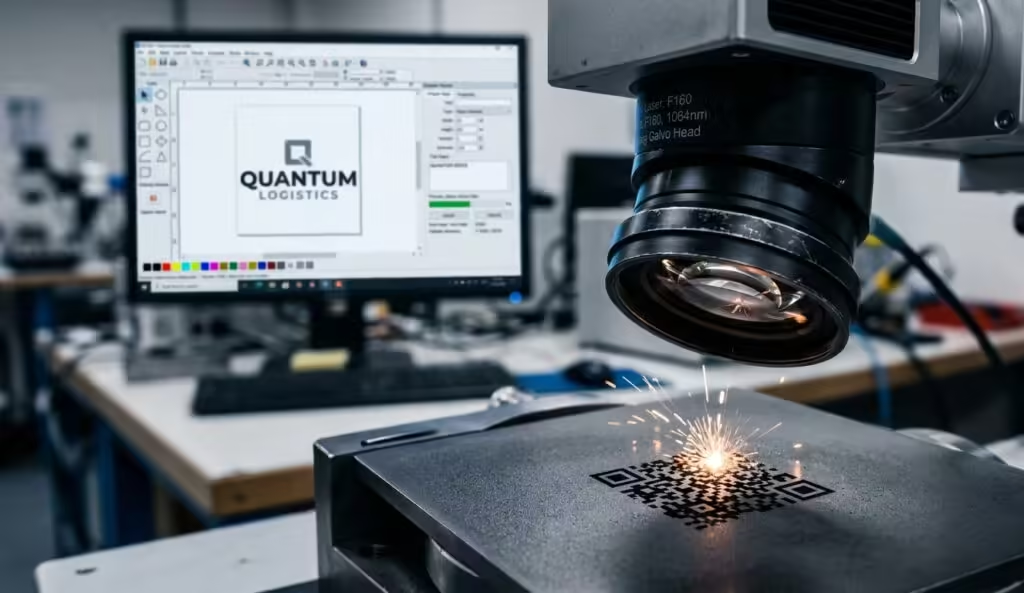
اللاعبون المهيمنان في هذا المجال، EZCAD (خاصة لأنظمة Galvo-fiber) و LightBurn (المعيار الصناعي لوحدات التحكم G-code و DSP)، يتطلبان أساليب تقنية متميزة. في حين أن الهدف النهائي هو علامة نظيفة ودائمة أو قطع دقيق، فإن المنطق وراء الإدخال يختلف. يستكشف هذا الدليل التعديلات الهندسية اللازمة لتقليل وقت الدورة وزيادة الإنتاجية باستخدام تكوينات احترافية لإعدادات برامج الليزر.
جدول المحتويات
الثالوث الأساسي: القوة والسرعة والتردد
كل مشروع ناجح يبدأ بالثلاثي الأساسي لإعدادات برنامج الليزر. يعد فهم فيزياء التراكم الحراري أمرًا ضروريًا هنا. تحدد الطاقة (مقاسة بنسبة مئوية من الحد الأقصى للمصدر) عمق التفاعل، بينما تحدد السرعة (مقاسة بـ مم/ثانية) وقت بقاء الليزر عند إحداثي واحد.
ومع ذلك ، فإن “التردد” (المقاس بالكيلو هرتز) هو المكان الذي يفشل فيه العديد من المشغلين التقنيين في التحسين. في تحديد الألياف ، يحدد التردد عدد نبضات الليزر التي يتم تسليمها في الثانية. ينتج التردد العالي علامات أكثر سلاسة وأقل عمقًا - مثالي لتلدين الفولاذ المقاوم للصدأ - بينما يزيد التردد المنخفض من الطاقة لكل نبضة ، وهو أمر ضروري للمهام العميقة للحفر أو “إزالة المواد”.
إعدادات تردد الليزر للفولاذ المقاوم للصدأ
عند العمل مع الفولاذ المقاوم للصدأ 304 أو 316، فإن متطلبًا شائعًا للمكونات الطبية أو الفضائية هو “التلدين”. يتطلب هذا ترددًا عاليًا (عادة 30-60 كيلو هرتز) وسرعات منخفضة لإنشاء طبقة أكسيد داكنة دون اختراق السطح. تضمن هذه العملية بقاء المواد مقاومة للتآكل، كما هو مذكور في دراسات علوم المواد المتعلقة بتخميل أسطح الفولاذ المقاوم للصدأ.
تحسين EZCAD: التظليل والمنطق المتجهي
بالنسبة لمستخدمي رؤوس الجلفو، فإن إعدادات التظليل في EZCAD2 للحفر العميق هي المعلمات الأكثر مناقشة في ورش العمل ذات المستوى الإنتاجي. التظليل هو عملية ملء شكل متجه بخطوط لإنشاء علامة صلبة.
لتحقيق عمق بالمواصفات الصناعية دون “تفحم”، غالباً ما يكون نمط متعامد أو “تشبيك” مطلوبًا. بدلاً من تمريرة واحدة في اتجاه واحد، تقوم تمريرة ثانوية بزاوية 90 درجة بإزالة الحطام من التمريرة الأولى. وفقًا لـ معهد الليزر الأمريكي (LIA), تداخل النبضات المناسب (عادةً 50-70%) مطلوب لضمان سطح نهائي موحد. سيؤدي الفشل في معايرة “تباعد الخطوط” (عادةً ما يتم تعيينه بين 0.03 مم و 0.05 مم) ضمن إعدادات برنامج الليزر الخاص بك إلى ظهور ملمس “مموج” يحبس الملوثات—وهو فشل كبير في التصنيع الدقيق.
كفاءة LightBurn: الإنتاجية وإدارة الطبقات
لقد أحدثت LightBurn ثورة في تجربة المستخدم لأنظمة CO2 والليزر الثنائي من خلال تقديم مكتبة الطاقة والسرعة الخاصة بـ LightBurn لليزر CO2. بالنسبة لمنشأة إنتاج، تعد هذه المكتبة أصلًا حاسمًا للدقة المتكررة. فهي تسمح للمهندسين بحفظ الإعدادات المسبقة الخاصة بالمواد، مما يضمن أن يكون الإنتاج المخصص في يناير مطابقًا لجودة دفعة تمت معالجتها في يونيو.
تعد ميزة “الطبقة الفرعية” (Sub-layer) واحدة من أقوى إعدادات برامج الليزر في LightBurn. تتيح هذه الميزة إجراء عمليات متعددة ضمن طبقة واحدة - على سبيل المثال، تمريرة “تنظيف” عالية السرعة تتبعها تمريرة “قطع” بطيئة. يؤدي هذا إلى تقليل المنطقة المتأثرة بالحرارة (HAZ) ويمنع ذوبان الحواف الشائع في المواد العضوية مثل الخشب أو البوليمرات عالية الكثافة.
المعلمات التقنية المقارنة: الألياف مقابل ثاني أكسيد الكربون
يوضح الجدول التالي الاختلافات في إعدادات برامج الليزر بين مصدرين الليزر الأكثر شيوعًا المستخدمين في البيئات الصناعية.
| مقياس فني | ليزر الألياف (تركيز EZCAD) | ليزر ثاني أكسيد الكربون (تركيز LightBurn) |
| التفاعل الأولي | المسار البارد / التلدين / النقش العميق | القطع الحراري / التبخير |
| التحكم بالنبض | التردد (كيلوهرتز) وعرض النبضة (نانوثانية) | تضمين عرض النبضة |
| تحمل التركيز | حاسم لحجم البقعة (عدسة f-theta) | متغير يعتمد على البعد البؤري (عدسة CO2) |
| قوة البرمجيات | التفقيس الدقيق وتسلسل الأجزاء | الهندسة المتجهة المعقدة ومنطق الطبقات |
| الطلب العام | تعليم رقم تعريف المركبة (VIN) في السيارات، نقش الأدوات | لافتات، تغليف، قطع حشوات |
استكشاف الأخطاء وإصلاحها للتشوه الهندسي والظلال
لا شيء يقتل الإنتاجية بشكل أسرع من عدم الدقة الهندسية. في إعدادات برامج الليزر الفنية، يتم التعامل مع هذا غالبًا من خلال “معايرة المجال”. إذا كانت دوائرك تبدو كبيضاويات، فمن المحتمل أنك تتعامل مع تشوه “انتفاخ” أو “شبه منحرف” في برنامج الجلفانو.
يتطلب تصحيح التشوه الهندسي في برامج الليزر مربع معايرة (عادة 50×50 مم). بعد وضع العلامات، تقوم بقياس الإخراج الفعلي باستخدام فرجار رقمي وإدخال الأبعاد “الفعلية” مقابل “المستهدفة” في البرنامج. يقوم هذا بإنشاء ملف تصحيح (ملف Cor) يضمن دقة مطابقة للمنتج عبر كامل مجال العمل.
التطويف أو الخطوط المزدوجة، من ناحية أخرى، غالباً ما تكون ناجمة عن “انحراف المسح”. في LightBurn، تعوض معلمة "إعدادات الليزر" المحددة هذه عن التأخير الطفيف في إطلاق الليزر أثناء تحرك البوابة بسرعات عالية. يضمن تعديل هذا أن تلتقي نقاط البداية والنهاية لمتجهاتك بشكل مثالي دون تأخير ميكانيكي.
المنطق الإنتاجي المتقدم: تقليل وقت الدورة
في منشأة ذات حجم إنتاج كبير، يمكن أن يؤدي تقصير كل دورة تعليم بمقدار 0.5 ثانية إلى توفير مئات الساعات التشغيلية سنويًا. يتم تحقيق ذلك من خلال تحسين “سرعة القفز” و“إعدادات التأخير” داخل البرنامج. من خلال ضبط “تأخير النهاية” و“تأخير الزاوية” في إعدادات برنامج الليزر الخاص بك، تضمن ألا يبقى الليزر لفترة طويلة في نهاية الخط، مما يتسبب في “نقاط” غير مرغوب فيها أو علامات حرق.
علاوة على ذلك، فإن استخدام مقايضة سرعة الليزر مقابل الطاقة للقطع النظيف أمر ضروري للحفاظ على سلامة المواد. غالبًا ما يكون من الأكثر كفاءة إجراء تمريرتين سريعتين بدلاً من تمريرة بطيئة واحدة. تمنع التمريرات السريعة المتعددة تراكم الحرارة في الركيزة، مما يؤدي إلى حافة أنظف وسلامة هيكلية أعلى للجزء النهائي.
خاتمة
إتقان إعدادات برنامج الليزر الخاص بك ليس مهمة لمرة واحدة بل هو عملية معايرة مستمرة. مع تقدم مصدر الليزر في العمر (تدهور عامل M2)، ستحتاج معاملاتك إلى تعديلات طفيفة للحفاظ على نفس مستوى الإنتاج الصناعي القياسي.
من خلال إعطاء الأولوية لنهج “مكتبة المواد” وتطبيق بروتوكولات معايرة صارمة لتصحيح التشويه الهندسي، تضمن منشأتك أن “الدفعة 1000” مثالية مثل النموذج الأولي. بالنسبة لأولئك الذين يتطلعون إلى التعمق في فيزياء التفاعل بين الليزر والمواد، فإن مكتبة IEEE Xplore الرقمية تقدم أبحاثًا شاملة حول التشكيل النبضي وتشكيل الشعاع.
تذكر دائمًا: في عالم الليزر الصناعي، أغلى تكوين لإعدادات برامج الليزر هو الذي لم تختبره قبل دورة الإنتاج الكاملة. تحقق دائمًا من إعداداتك المسبقة باختبار شبكي محلي لمراعاة المتغيرات البيئية الخاصة بموقعك.
التعليمات
لماذا تبدو نقوشي ضبابية حتى مع التركيز؟
هذه عادة مشكلة في إعدادات برنامج الليزر تتعلق بـ “تباعد التظليل”. إذا كانت الخطوط متقاربة جدًا، فإن الحرارة تتسرب، مما يؤدي إلى طمس التفاصيل. يجب عليك زيادة التباعد أو تقليل الطاقة.
كاميرا LightBurn الخاصة بي لا تعمل بشكل مستقيم. كيف يمكنني إصلاحها؟
يبدأ استكشاف أخطاء معايرة كاميرا LightBurn عادةً بمعالج “معايرة العدسة”. تأكد من تثبيت الكاميرا بإحكام؛ حتى الإزاحة بمقدار 1 مم ستفسد دقة التراكب.
ما هي أفضل طريقة لتجنب “التأرجح” عند السرعات العالية؟
قم بتمكين “المسح الزائد” في إعدادات برنامج الليزر الخاص بك. هذا يخبر رأس الليزر بالسفر قليلاً بعد حدود المتجه قبل الانعطاف، مما يسمح للبوابة بالتباطؤ دون إشعال الشعاع.
كيف أحصل على علامة سوداء داكنة على الألومنيوم؟
يتطلب هذا ليزر MOPA أو إعدادات تردد محددة. استخدم ترددًا منخفضًا وطاقة عالية لإزعاج السطح، يليه مرور بتردد عالٍ “لتنظيف” الحطام.