

Laser Power vs Speed: How Energy Density Determines Engraving Quality
Laser Power vs Speed is one of the most critical variables in laser engraving and cutting, yet it is often simplified into a basic trade-off between power and productivity. In real-world applications, however, the relationship is far more nuanced. These two parameters work together to determine how energy is transferred to a material, directly influencing engraving depth, edge clarity, and process stability.
Rather than adjusting them independently, experienced operators treat Laser Power vs Speed as a combined control system. The goal is to deliver the right amount of energy—not the maximum—so that the material responds predictably without introducing unnecessary thermal damage.
Оглавление
What Does Laser Power vs Speed Really Mean?
At a fundamental level, Laser Power vs Speed describes how energy output interacts with motion. Laser power defines how much energy is available, while speed determines how long that energy is applied to a specific point on the material surface.
A slower speed increases exposure time, allowing more energy to accumulate and penetrate deeper into the material. A higher speed reduces interaction time, which lowers the effective energy input. Because of this relationship, Laser Power vs Speed must always be adjusted together to maintain consistent results.
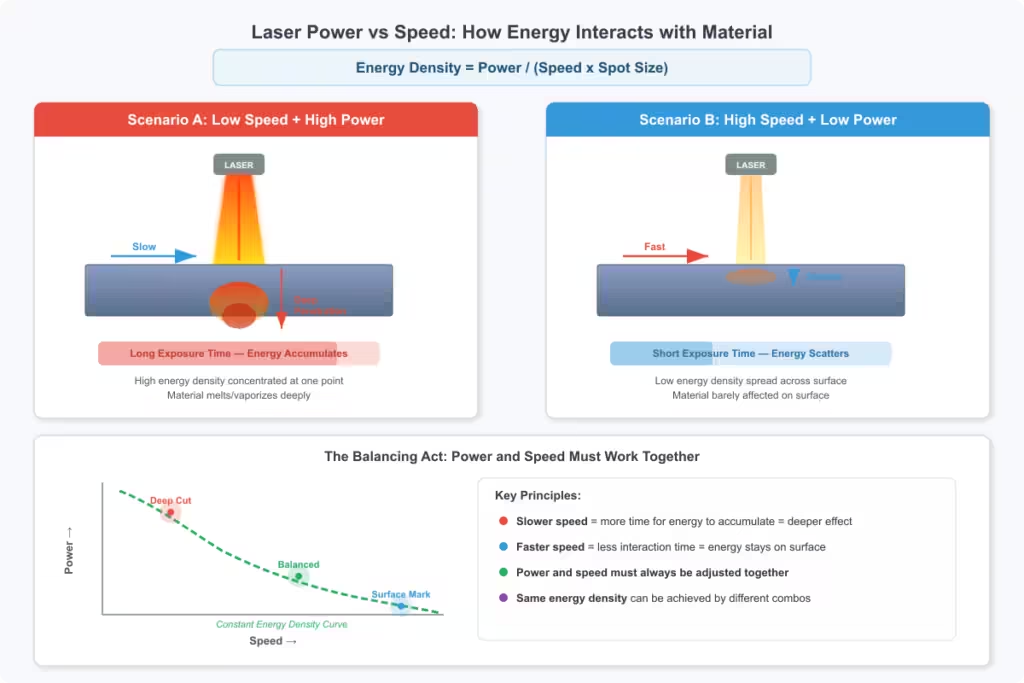
The Physics Behind It: Energy Density
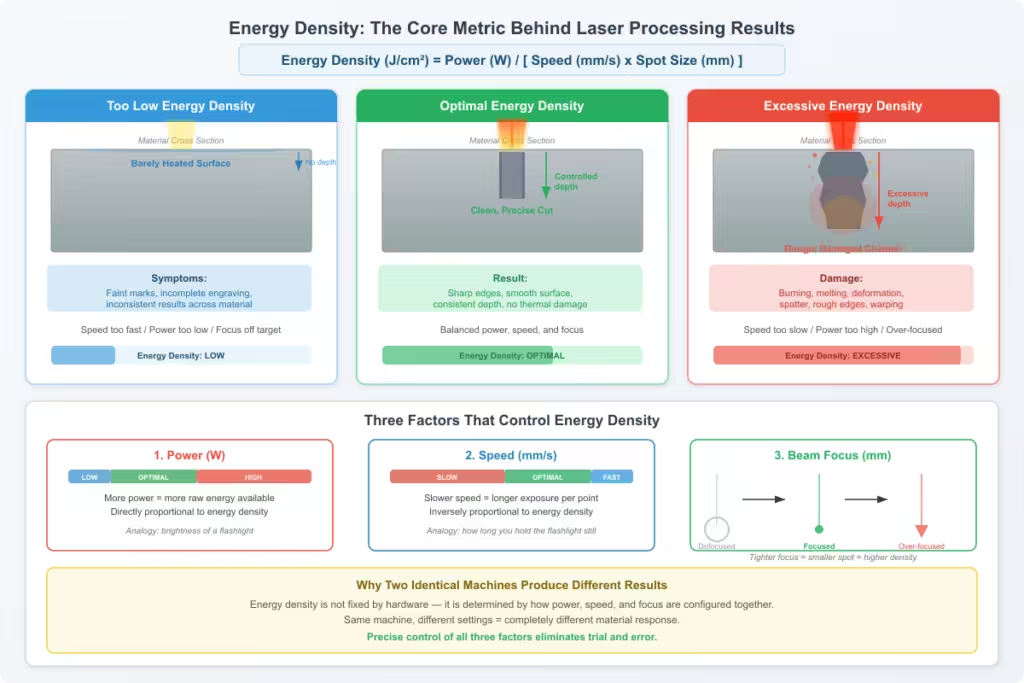
The concept that connects Laser Power vs Speed is energy density. This is the amount of energy delivered per unit area, and it ultimately determines whether the material is lightly marked, cleanly engraved, or thermally damaged.
Energy density is influenced by power, speed, and beam focus. When it is too low, the laser may only heat the surface slightly, leading to weak or incomplete engraving. When it is too high, excessive heat can cause burning, melting, or deformation.
This is why two identical machines can produce very different outcomes depending on how Laser Power vs Speed is configured. Understanding this principle allows for more precise control instead of relying on trial and error.
Effect of Laser Power on Material
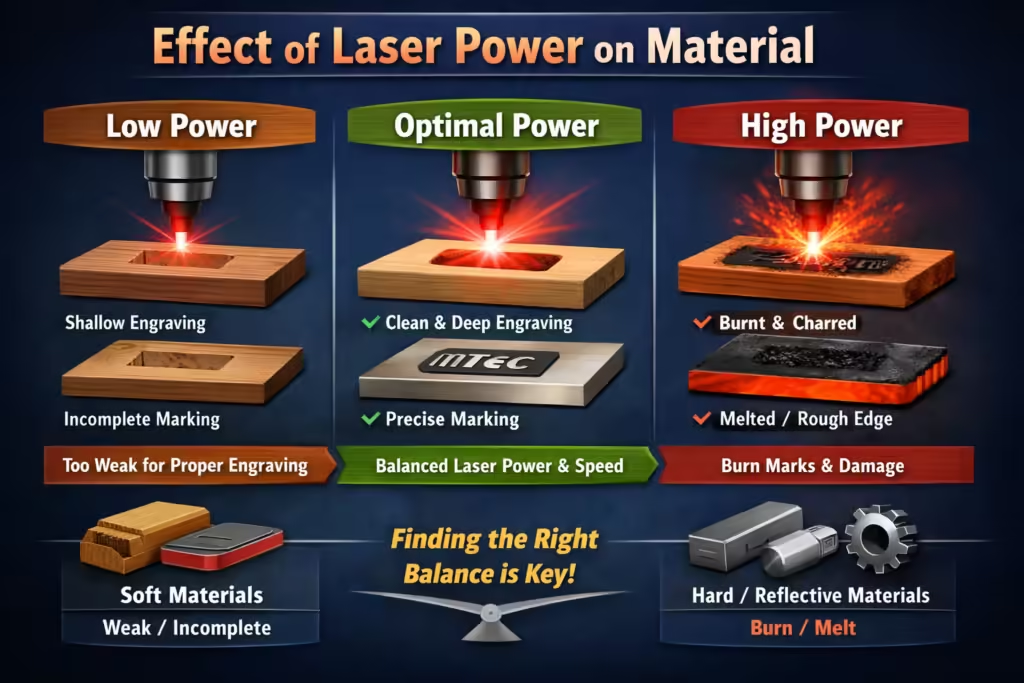
The effect of laser power on material is primarily thermal. Increasing power raises the amount of heat introduced into the material, which can improve engraving depth and efficiency when used correctly.
However, higher power is not always better. Materials such as plastics, wood, or coated metals can react quickly to excess heat, resulting in burn marks, discoloration, or rough edges. In these cases, improper Laser Power vs Speed settings often lead to quality issues rather than performance gains.
For harder or more reflective materials, higher power may be necessary, but it still needs to be balanced with speed to avoid unstable results.
How Speed Influences Engraving Results
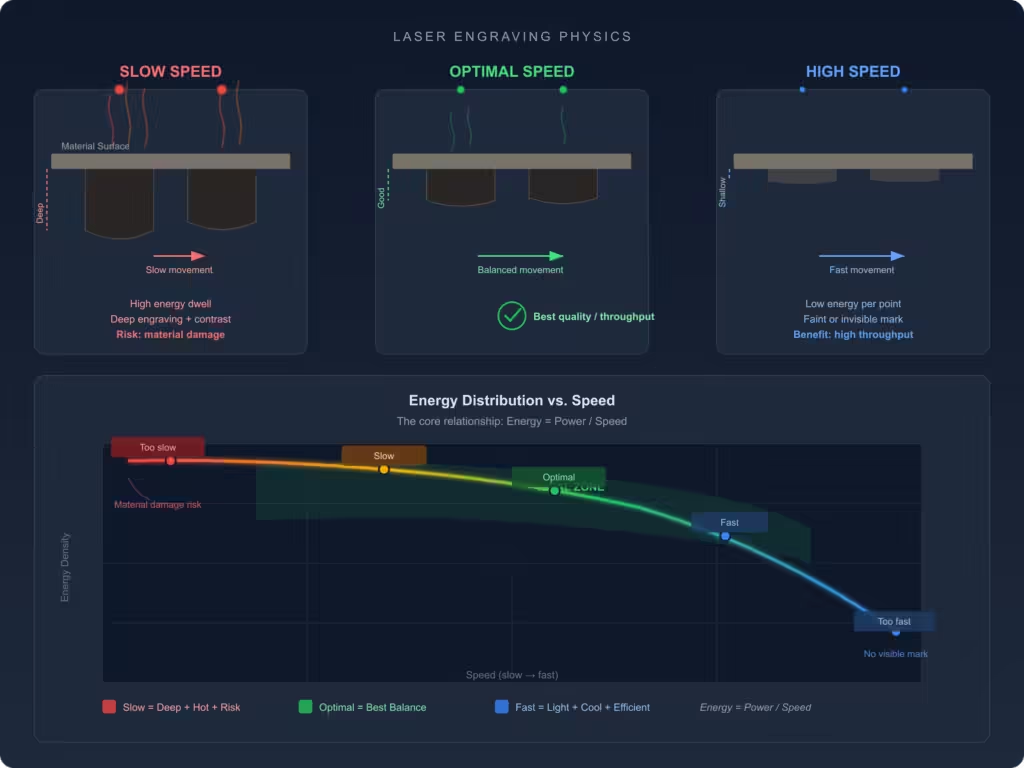
Speed plays a critical role in controlling how energy is distributed during processing. Slower speeds allow the laser to dwell longer on the surface, increasing engraving depth and contrast. Faster speeds, on the other hand, reduce heat buildup and improve throughput.
If speed is too high, the laser may not deliver enough energy to achieve a visible or durable mark. If it is too low, excessive heat accumulation can damage the material. Achieving the right Laser Power vs Speed balance ensures that energy delivery matches the material’s response.
What Is Laser Beam Quality and Why It Matters?
Laser beam quality, often described by the M² factor, determines how tightly the beam can be focused. A higher-quality beam can concentrate energy into a smaller spot, resulting in higher energy density even at lower power levels.
This has a direct impact on Laser Power vs Speed optimization. A machine with better beam quality can achieve cleaner edges, finer details, and more consistent engraving without needing excessive power. In contrast, poor beam quality may require slower speeds or higher power to compensate, which can introduce additional heat-related issues.
How to Optimize Laser Power vs Speed
Optimizing Laser Power vs Speed is best approached methodically. Instead of making large adjustments, it is more effective to start with moderate settings and refine them incrementally based on observed results.
If the engraving is too shallow, reducing speed or slightly increasing power can improve depth. If the material shows signs of burning, increasing speed or lowering power is usually the better approach. Maintaining consistent focus and material conditions is essential during this process to ensure accurate comparisons.
Over time, this method leads to a reliable set of parameters tailored to different materials and applications.
Material-Specific Considerations
Different materials respond to laser energy in very different ways, which makes it impossible to define a universal setting. Metals typically require higher energy density due to their reflectivity and thermal conductivity, while organic materials absorb energy more readily and require more controlled input.
Because of these differences, Laser Power vs Speed must always be adjusted based on the specific material, thickness, and surface condition. What works for stainless steel may not work for acrylic or wood, even on the same machine.
Common Problems and How to Fix Them
Unbalanced Laser Power vs Speed settings often result in predictable issues. Shallow engraving usually indicates insufficient energy density, while excessive burning suggests that too much energy is being delivered to the material.
Inconsistent results may be caused by factors such as poor beam quality, incorrect focus, or unstable material positioning. Before adjusting parameters, it is important to identify whether the issue is related to Laser Power vs Speed or another variable in the system.
Power vs Speed Comparison Table
| Setting tendency | Result | Main risk |
|---|---|---|
| Higher power, slower speed | Deeper engraving and stronger material removal | Overburn and melting |
| Lower power, faster speed | Faster processing with lighter marking | Incomplete engraving |
| Higher power, faster speed | Balanced efficiency and output | Sensitive to beam quality |
| Lower power, slower speed | Controlled surface processing | Lower productivity |
Practical Tips for Better Results
Consistent results depend on more than just parameter settings. Clean optics, stable focus, and uniform material conditions all play a role in maintaining quality.
Small adjustments to Laser Power vs Speed are generally more effective than large changes, especially when fine-tuning engraving results. Keeping a record of successful settings can also improve efficiency and reduce setup time in future projects.
Conclusion
Laser Power vs Speed is not simply a machine setting—it is the foundation of laser processing performance. By understanding how energy density, beam quality, and material behavior interact, operators can achieve more precise and consistent results.
When applied correctly, Laser Power vs Speed allows for better control over engraving quality, reduced defects, and improved overall efficiency, making it an essential concept for any advanced laser application.
ЧАСТО ЗАДАВАЕМЫЕ ВОПРОСЫ
What is Laser Power vs Speed in laser engraving?
Laser Power vs Speed refers to the relationship between the laser’s output power and its movement speed during engraving or cutting. These two parameters work together to control how much energy is delivered to the material surface, which directly affects engraving depth, quality, and consistency.
How does Laser Power vs Speed affect engraving quality?
Laser Power vs Speed affects engraving quality by determining energy density. Higher power combined with slower speed increases energy input, resulting in deeper engraving, while lower power or faster speed reduces energy density and produces lighter or shallower marks.
What is the best Laser Power vs Speed setting?
There is no single best Laser Power vs Speed setting because it depends on the material type, thickness, and desired result. The optimal setting is the one that provides enough energy for clean engraving without causing burning, melting, or incomplete processing.
Why is my laser engraving too shallow?
Shallow engraving is usually caused by insufficient energy density. This can happen when the laser power is too low, the speed is too high, the beam is not properly focused, or the material does not absorb energy efficiently.
Why does laser engraving burn the material?
Burning typically occurs when too much energy is delivered to the material. This is often due to high power combined with low speed, which increases heat buildup and leads to scorching, melting, or discoloration.
How do I balance Laser Power vs Speed correctly?
The best way to balance Laser Power vs Speed is to adjust one parameter at a time while keeping other conditions stable. Start with moderate settings, then fine-tune based on engraving depth, edge quality, and material response.